

ITS Messages to Students and Employees
To keep you informed about updates to FGCU-supported systems that may impact how you work or interact with technology on campus. Our goal is to help you stay prepared and protected - all part of our commitment to "Protect the Nest."
-
September 2025
Toggle More InfoSeptember 3, 2025
Subject: Coming Soon: Workday Trainings Offered September to NovemberImpacted Audience: Faculty and Staff
Impacted System: Workday
Great news! Are you in need of a Workday task refresher? Then you’re in luck! The Workday Finance & Human Resources Open/Drop-in Labs offer a mix of virtual and in-person training opportunities.
When is this happening: Sessions will be offered from September 23 through November 3 to better accommodate employee work schedules.
Why attend: These events provide staff and faculty, including new hires, with the opportunity to experience:
- Virtual training open labs (guided coverage)
- In-person drop-in computer labs (come and go as you want with hands-on guidance)
- Demonstrations and answers to your Workday questions
- Topic-specific sessions with a subject-matter expert
How to attend: To learn more, view the schedule and register for your desired session(s) through the Workday Open Labs website. Calendar invites and reminders will be provided for registered session(s).
Questions now? Feel free to contact the University Help Desk at the number and email listed in the signature below, or visit the Workday Training website to review job aids, video and more.
September 9, 2025
Subject: Protect Yourself from Spam EmailsImpacted Audience: All Faculty, Staff and Students
Phishing alert: Spam emails continue to increase in frequency. Information Technology Services (ITS) wants to remind everyone to stay safe and be on the lookout for potential phishing emails. The university is experiencing an increase in spam emails.
Recent subject lines include:
- FGCU Expiration Notice O8/ 26/ 2025. Act Now
- FGCU Notice – September 08, 2025: Action Required
- URGENT: FINAL WARNING
- ATTENTION NEEDED IMMEDIATELY
- FGCU Athletics Opportunity Offer
- FGCU Notification Offer Act Now 08/27/2025
- FGCU Urgent Action
These emails are not from the university, and you should not click on any links or reply to these types of emails. If you received one of these emails, delete it. See below for more tips.
Threat level: While FGCU has email filtering and advanced message protection, sometimes malicious emails can still make it to your inbox. We urge you to practice extreme caution when opening emails from people you have never interacted with or are not expecting an email from.
Protect yourself: To better protect yourself, know/do the following:
- FGCU will never ask for your password for any of your accounts
- FGCU will never ask for your social security number
- Never accept DUO authentication requests that you did not initiate
- Never share your FGCU password with anyone
- Never click on links in emails you were not expecting and from senders you do not know
Think you’ve been impacted? If you think you may have accidentally responded to a phishing email, contact the University Help Desk immediately and review the “What to Do If Hacked or Suspect You Were” Knowledge Base article for additional safeguards.
Thank you for staying vigilant to protect the nest.
September 11, 2025
Subject: Boost Your Efficiency with AI - Join the Copilot Chat ChallengeIntroducing the FGCU Copilot Chat Challenge: A six-week campus-wide journey to help you harness the power of artificial intelligence (AI), reclaim your time and level up how you work, learn and collaborate. The challenge begins September 29 and ends November 7.
Ready to embark? Register today!
What you’ll pick up along the route:
- Save time and boost efficiency to handle everyday tasks faster.
- Speed up writing, research and making sense of complex topics.
- Collaborate smarter with AI as your assistant.
- Earn a digital badge, weekly shoutouts and hear from colleagues.
"Using Copilot Chat saved me four hours on a complex analysis task, which would've taken five hours; I completed in just one. That extra time let me focus on the creative work instead. Not bad."
- Rosario Welle
Marketing & Communications Coordinator l * Provost & Executive Vice President Administrative Operations
Your itinerary (how it works):
- Start Date: Monday, September 29
- Format: Hybrid (Email, Microsoft Teams and Web)
- Mini Missions: 10 to 15-minute daily challenges
- Weekly Checkpoints: Quick tips and examples
- Support: A dedicated Microsoft Teams channel for Q&A and sharing wins
Let’s make this a fun and impactful journey together!
Want to get your team involved? Departmental training is also available. Click here to inquire.
September 17, 2025
Subject: Now In Workday: New Apps For Requesting and Managing Time OffImpacted Audience: All Faculty & Staff
Impacted System: Workday
What’s happening: We are making it easier to request and manage time off in Workday. Starting today, two new apps will be displayed from the menu: “Request Absence and Manage Absence.”
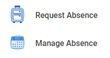
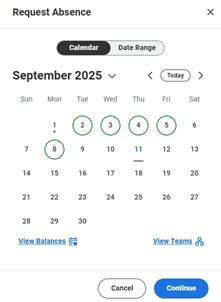
1) Request Absence
- Displays a request absence micro calendar, enabling you to:
- Request time off via a calendar view or a date range.
- View your time-off balances.
- View team members' time-off dates.
- How it works: Select your time-off date(s), click the Continue button to select the absence type and then submit the request.
2) Manage Absence- Displays the full absence calendar, enabling:
- Employees to cancel unapproved requests and view both submitted time off and current time-off balances.
- Managers to correct time-off requests and enter time off on behalf of their employees using the Switch Worker
Pro Tip: Prefer a different order for your listed Workday apps? You can rearrange the apps using the Edit button from the bottom of the displayed menu and then click and drag an app to the preferred order.
Important Note: If you typically start the day with Workday open, you may need to log out and log back in for the changes to take effect.
To access: Open Workday > select Menu > select Request Absence or Manage Absence
To learn more: Updated job aids with more details are available on the Workday Training site.
Questions? Contact payrolloffice@fgcu.edu for pay questions and benefitsandwellness@fgcu.edu for benefits questions.
September 25, 2025
Subject: Report Issues with aPlus+ Attendance Tool to the University Help Desk
Impacted Audience: Faculty
Impacted System: aPlus+ Attendance Tool
Stay proactive: While no issues have been reported with the aPlus+ Attendance tool, faculty are advised to contact the University Help Desk immediately should any problems arise. Prompt reporting will help ensure minimal disruption to course delivery.
Need help? Contact the University Help Desk.
Thank you for your continued support in maintaining a reliable and secure learning environment at FGCU.
-
October 2025
Toggle More InfoOctober 2, 2025
Subject: Protect Yourself from Spam Emails
Impacted Audience: All Faculty, Staff and Students
Phishing alert: Spam emails continue to increase in frequency. Information Technology Services (ITS) wants to remind everyone to stay safe and be on the lookout for potential phishing emails. The university is experiencing an increase in spam emails.
Recent subject lines include:
- Fw: SWIFT ACTION REQUIRED
- Re: Executive Committee Meeting 🚨
What to do: These emails are not from the university, and you should not click on any links or reply to these types of emails. If you received one of these emails, delete it. See below for more tips.
Threat level: While FGCU has email filtering and advanced message protection, 156,199 phishing emails were blocked in September; sometimes malicious emails can still make it to your inbox. We urge you to practice extreme caution when opening emails from people you have never interacted with or are not expecting an email from.
Protect yourself: To better protect yourself, know/do the following:
- FGCU will never ask for your password for any of your accounts
- FGCU will never ask for your social security number
- Never accept DUO authentication requests that you did not initiate
- Never share your FGCU password with anyone
- Never click on links in emails you were not expecting and from senders you do not know
Think you’ve been impacted? If you think you may have accidentally responded to a phishing email, contact the University Help Desk immediately and review the “What to Do If Hacked or Suspect You Were” Knowledge Base article for additional safeguards.
October is Cybersecurity Awareness Month: A time to focus on protecting yourself online. Stay alert and don’t fall for phishing scams. If something feels suspicious, trust your instincts and delete it!
Thank you for staying vigilant to protect the nest.
October 17, 2025
Subject: Employee: Help FGCU Students Become State Cybersecurity Trivia Champions
Impacted Audience: Faculty & Staff
 Get the Word Out! October is Cybersecurity Awareness Month, and FGCU students are invited to participate
in a state-wide cybersecurity trivia competition October 20-31 with all State University System of Florida institutions. This year’s event has a
Halloween theme and is called “Cyberween 2025.”
Get the Word Out! October is Cybersecurity Awareness Month, and FGCU students are invited to participate
in a state-wide cybersecurity trivia competition October 20-31 with all State University System of Florida institutions. This year’s event has a
Halloween theme and is called “Cyberween 2025.”Here's How Employees Can Support FGCU Students: Encourage and remind students to access FGCU's Cyberween website to access the trivia game to answer trivia questions and stay current on which school is winning.
When is Game Time: The trivia competition will take place via the online trivia game site, which is hosted by the University of Florida. The competition pits school against school to show off students’ cybersecurity knowledge.
How to Win: The school with the largest percentage of student participation will win. A live score will be provided throughout the game. Each person can only play for credit once.
Wings Up & Go Eagles!
October 20, 2025
Subject: Students: Compete in the State Cybersecurity Trivia Championship October 20-31
Impacted Audience: All Students
Get the Word Out! October is Cybersecurity Awareness Month, and FGCU students are invited to participate
in a state-wide cybersecurity trivia competition with all Florida universities. This
year’s event has a Halloween theme and is called “Cyberween 2025.” Help FGCU become state champions!When is Game Time: The trivia competition takes place October 20-31 via an online trivia game site, hosted by the University of Florida. The competition pits school against school to show off students’ cybersecurity knowledge. This is FGCU’s opportunity to show we’re unstoppable in our cybersecurity expertise as a student body.
How to participate: Visit FGCU's Cyberween website to access the trivia game. Use this page to answer trivia questions and stay current on which school is winning.
How to win: Participate! The school with the largest percentage of participation will win. A live score will be provided throughout the game. Each person can only play for credit once. The more participation numbers we have, the better our odds of winning.
Critical game time tip: After you play the Cyberween trivia game, a screen appears showing your score. You will be asked to select the FGCU pumpkin and log in using your FGCU credentials to ensure your score/activity is counted. Play now to help FGCU win!
Wings Up & Go Eagles!
October 31, 2025
Subject: FGCU's Password Reset System Upgrades on November 2
Impacted Audience: Faculty, Staff and Students
Impacted System: Identity Management System (i.e., password resets and account setup)
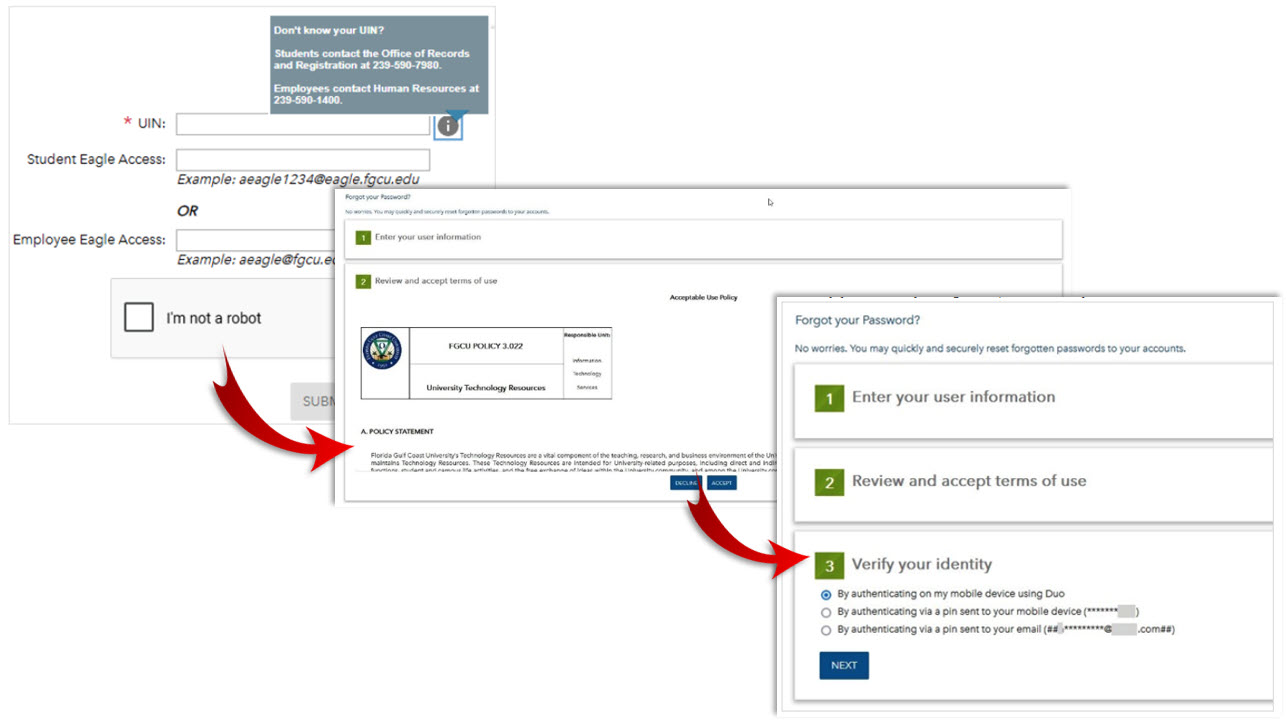
What’s happening: On Sunday, Information Technology Services (ITS) will upgrade FGCU’s Identity Management System, which handles password resets and account setup for new students and employees. This upgrade will enhance network security and protect user data. The only noticeable change is a more streamlined look and feel that offers a more efficient experience, as shown below.
FROM THIS
TO THIS
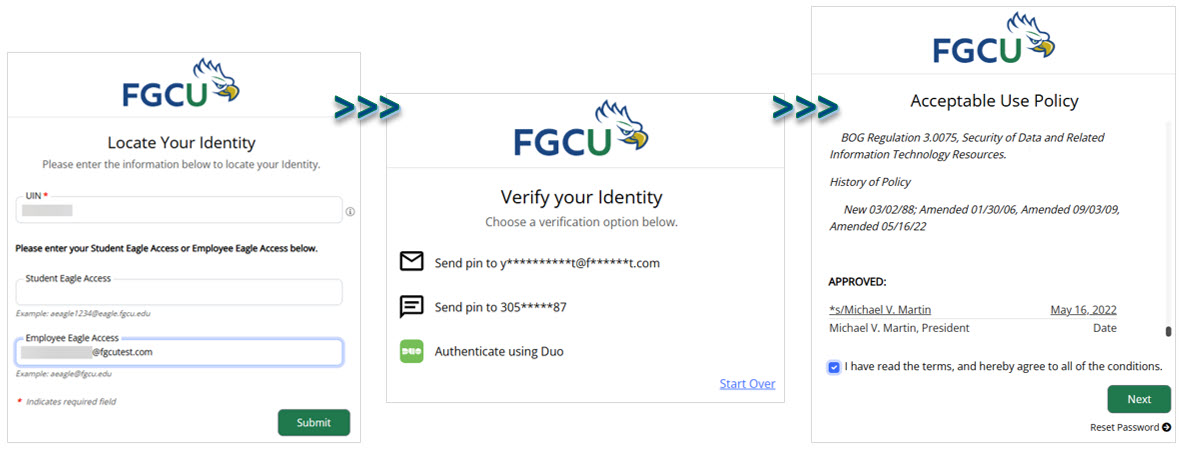
What this means: Changing your password is still as easy as 1-2-3:
Step 1: Locate your identity > Step 2: Confirm your identity > Step 3: Accept the Use Policy
What you need to do: Nothing. Simply access the Password Reset site as you normally do to change your password (or to claim your account for the first time).
Go deeper: Access the Changing Your Password or Accessing Your Eagle Access Account for the First Time (Claim Your Account) Knowledge Base articles for detailed instructions.
Concerned about phishing attempts? We’ve got you covered. Review the What to Do If Hacked or Suspect You Were Knowledge Base article.
Questions? Contact the University Help Desk.
-
November 2025
Toggle More InfoNovember 5, 2025
Subject: New In Workday: Streamlined Travel Process for External Committee Members
Impacted Audience: All Faculty & Staff
Impacted System: Workday
Great news! The External Committee Member (ECM) process used to reimburse travel expenses for non-employee individuals is now available in Workday!
The ECM process replaces the Travel Authorization Request and Travel Reimbursement Request for Non-Workers. This change reduces paperwork, centralizes documentation in Workday and simplifies trip preparation.
Step-by-step instructions: View the “External Committee Member” job aid in the Workday Training site.
Bonus: You can reassign travel card transactions to the external committee member and include them in your expense report – no need for a separate document!
Questions? Contact travel@fgcu.edu for any questions related to travel expenses.
November 11, 2025
Subject: Results for the Cybersecurity Trivia ChallengeImpacted Audience: All Students
Thank you! FGCU students gave their all, the margins were tight and you did very well. New College
of Florida was the winner this year.Results: Visit FGCU’s Cyberween website to view university scores and the correct answers to the trivia questions.
How we did: FGCU had a good turnout for the third annual State University System of Florida cybersecurity trivia challenge. The university ranked 8th out of the 12 universities. We appreciate everyone who participated and scored points for FGCU.
Thank you for helping FGCU stay safe, showing off your cybersecurity prowess and being vigilant about protecting yourself online – this is what really matters. Till next year.
Wings Up & Go Eagles!
-
December 2025
Toggle More InfoDecember 5, 2025
Subject: Have a New Phone? Reactivate DUO Mobile App
Impacted Audience: Faculty, Staff and Students
Impacted System: DUO Mobile
 Have a new phone? With the holidays approaching, it’s a good time to remind everyone to reactivate
the DUO Mobile app on new phones. The DUO app safeguards your accounts, data and identity
via the most user-friendly way to authenticate who you are. Download the DUO Mobile
app today!
Have a new phone? With the holidays approaching, it’s a good time to remind everyone to reactivate
the DUO Mobile app on new phones. The DUO app safeguards your accounts, data and identity
via the most user-friendly way to authenticate who you are. Download the DUO Mobile
app today!To reactivate DUO Mobile on a new phone: Access the 2FA Device Management page.
To manage 2FA (two-factor authorization) on your devices now: Access the Two-Factor Authentication Management page.
To learn more about 2FA: Access the Two-Factor Authentication (2FA) instruction page.
Questions? Contact the University Help Desk.
December 8, 2025
Subject: Submit Fall Term Grades in Canvas by Noon December 16Impacted Audience: Faculty & Adjuncts
Impacted System(s): Submit Grades Tool in Canvas
What’s coming: It’s that time of year again when final grades are submitted for the fall term. In preparation, Information Technology Services (ITS) wants to remind you about the Submit Grade tool in Canvas and a few additional resources to help make this time of year easier on you.
When is it coming: The deadline to input grades is noon Tuesday, December 16.
Why this matters: The Submit Grades tool allows instructors to complete the final grading process in Canvas and submit those grades directly to Gulfline, streamlining the process. Note: Use of this tool is optional. Grades may be entered directly into Gulfline. One of the main advantages of using the Canvas tool is the ability to review grades and change them before submitting!
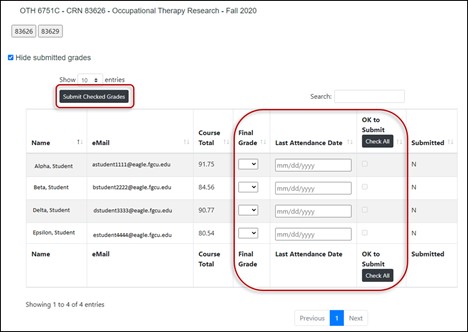
How to review and change grades: Within the Canvas Submit Grades tool on the class roster screen (pictured below), you can review and change grades before they become final. Information provided will be officially sent to Gulfline/Banner when you select the Submit Checked Grades button. For step-by-step instructions, please review the Canvas Submit Grades User Guide.
What to do now: Please review the links and resources below to assist you when preparing for grade submissions.
- CRN Distribution: Enables you to email everyone in a specific class using a distribution list. These lists are generated approximately three weeks before classes start and are valid for that semester only.
The prefix for all CRN lists is “crn” followed by the course code and term, which is “08” for fall.
“crn” + course code + term
EXAMPLE: Crn11501202108@eagle.fgcu.edu
Use the CRN address in the “To” field, create your email as usual and send. Each member of the class will receive your message. To learn more, use the following guide: Send Email to Your CRN (ITS Knowledge Base).
- For instructions and important information on using the Submit Grades tool, review the Canvas Submit Grades User Guide.
December 10, 2025
Subject: Updates Coming to Gulfline December 17
Impacted Audience: Students (Faculty and Staff)
Impacted System: Gulfline
Good news! We are excited to announce that Gulfline will be upgraded at the end of the fall semester, with the transition scheduled for December 17. This upgrade provides a more modern and intuitive experience for students, along with several key enhancements.
What’s Changing
- Improved User Interface & Navigation: This upgrade offers a cleaner, more user-friendly design that simplifies access to key features.
- Mobile Responsiveness: Gulfline will be optimized for use on mobile devices, making it easier to manage tasks on the go.
- Enhanced Schedule Planning: The existing “Schedule Planner” will be retired and replaced by the new Gulfline “Plan Ahead” feature, offering improved functionality and usability in one place!
- Student Contact Information Management: Students will be able to edit their own contact information directly within Gulfline, improving data accuracy and reducing administrative overhead.
What to Expect
- Training and support resources are available to ensure students are well-prepared
for the transition to the updated system:
- How to Register for Classes video (7:02) and Overview Guide
- Using Plan Ahead to Register video (3:45) and Overview Guide
- Browse Classes Overview Guide
- Updates will be easily accessible via the Gulfline quick link in the MyFGCU app and the Web version.
Questions? Contact the University Help Desk.
We appreciate your continued support as we enhance the digital experience for our campus community.
Wings Up & Go Eagles!
December 11, 2025
Subject: Eduroam Update Coming December 21
Impacted Audience: Students, Faculty and Staff
Impacted System: eduroam Wi-Fi Network
Happening soon: On Sunday, December 21, an update to eduroam will occur, creating a more reliable and resilient connectivity experience. The eduroam system will be unavailable between 7 a.m. and noon.
What this means: After the update and while logged into eduroam, you will need to re-register your device to authenticate your credentials. Configuring your device to eduroam will be as easy as 1–2–3:
Step 1: Select the eduroam network > Step 2: Authenticate > Step 3: Connect
- Select eduroam from the network list.
- Authenticate with your email and password.
- Connect and start using the secure eduroam Wi-Fi network, which is now up to 100 Megabits!
What you need to do: Nothing at this time. Links to the impacted Knowledge Base articles are provided below for your reference and will be updated on Sunday as well.
Questions? Contact the University Help Desk.
-
January 2026
Toggle More InfoJanuary 16, 2026
Subject: AI Listening Sessions: Let’s Talk About Your AI Needs at Work January 26 - February 4
Impacted Audience: All Faculty and Staff
FGCU is exploring how Artificial Intelligence (AI) can support our academic and administrative work, and we want your input.
Starting January 26, we will host a series of AI listening sessions for all faculty and staff. These sessions will provide an opportunity to share your thoughts about AI’s role within your work at FGCU. Your feedback will help determine the next AI prompt tool and ensure that our approach reflects the needs and perspectives of our university community. Tools being considered include Copilot 365, ChatGPT and Gemini.
Why participate? Your voice matters. These sessions are designed to encourage open dialogue and ensure the university’s approach reflects the needs and perspectives of the community.
What to expect:
- Hybrid format: Attend in person or virtually
- Join when it works for you: Multiple sessions are offered to align with your availability (you only need to attend one session).
> January 26 from 2 p.m. – 3 p.m. at Academic Building 9, Room 106, or join virtually via Microsoft Teams
> January 27 from 10 a.m. – 11 a.m. at Academic Building 9, Room 106, or join virtually via Microsoft Teams
> February 3 from 3 p.m. – 4 p.m. at Academic Building 9, Room 106, or join virtually via Microsoft Teams
> February 4 from 10 a.m. – 11 a.m. at Academic Building 9, Room 106, or join virtually via Microsoft Teams
- Interactive discussion: Each session includes engaging activities designed to capture your input in real time and encourage meaningful dialogue.
- Guiding questions: Shared in advance to help you prepare!
- What tasks or challenges in your daily work would you most like an AI tool to help with?
- What would an ideal experience with an AI tool look like for you?
- What concerns or hesitations do you have about using AI tools in your work?
- How do you currently find information or complete repetitive tasks, and what’s the most time-consuming or frustrating part of that process?
- What support or resources would you need to effectively use AI, and how do you prefer to learn when adopting new tools?
- What outcomes would make you say, “This AI tool is a success for me”?
- Which AI prompt tool do you believe would best serve FGCU and why (O365 Copilot (Premium License), ChatGPT, or Gemini)?
Next steps: Following the listening sessions, a feedback survey will be sent to offer another opportunity to provide your thoughts and insight to help guide the selection of FGCU’s next AI prompt tool.
Thank you for helping us shape the future of AI at FGCU!
January 20, 2026
Impacted Audience: Faculty, Staff and Students
Impacted System: eduroam Wi-Fi Network
Happening Sunday! Between 7 a.m. and noon, Sunday, January 25, an update to eduroam will occur. The eduroam system will be unavailable during this approximate maintenance window. This update will create a more reliable and resilient connectivity experience.
What this means: After the update and while logged into eduroam, you will need to re-register your device to authenticate your credentials. Configuring your device to eduroam will be as easy as 1-2-3:
Step 1: Select the eduroam network > Step 2: Authenticate > Step 3: Connect
- Select eduroam from the network list.
- Authenticate with your email and password.
- Connect and start using the secure eduroam Wi-Fi network, which is now up to 100 Megabits!
Knowledge Base instructions will become easier and shorter!
What you need to do: Nothing at this time. Links to the impacted Knowledge Base articles are provided below for your reference and will be updated on Sunday as well.
- Using the eduroam Wireless Network
- How to Configure Your Device to Use eduroam
- One-time Android exception: Following this update, users of Android 10 (or later) devices will need to select the option to not validate when re-registering the eduroam network. This article will be updated with step-by-step instructions and screenshots.
Questions? Contact the University Help Desk.
-
February 2026
Toggle More InfoFebruary 10, 2026
Impacted Audience: Faculty and Staff
Good afternoon,
Thank you to all the staff and faculty who attended the Artificial Intelligence (AI) listening sessions over the past two weeks. As a follow-up to these sessions, we invite you to share additional thoughts through the FGCU AI‑Awareness and Readiness Survey by Friday, February 13.
Created by Dendritic: A Human-Centered AI and Data Science Institute at FGCU, the survey takes less than 10 minutes to complete. The survey is another opportunity for employees to share their thoughts about AI’s role in supporting academic and administrative work at FGCU.
Participating in this process ensures your needs and perspectives directly shape the university’s direction when an enterprise AI assistant (prompting tool) is selected. For your reference, the slide deck used during the listening sessions is attached to this email.
Next Steps:
- The AI survey closes February 13.
- Themes and recommendations will be compiled and shared with university leadership. These insights will guide the selection of FGCU’s next AI prompt tool.
- Additional communications, training opportunities and implementation updates will follow.
Thank you again for your time and commitment. Your feedback is essential in helping us shape the future of AI at FGCU.
Additional feedback, questions, concerns? Contact itschange@fgcu.edu.
February 23, 2026
Impacted Audience: Faculty & Staff
Impacted System: Workday
Great news! Are you in need of a Workday task refresher? Then you’re in luck! The Workday Finance & HR Open/Drop-in Labs offers a mix of virtual and in-person training opportunities.
When is this happening: Trainings will be offered through March 18 through May 2 to better accommodate employee work schedules.
Why attend: These events provide staff and faculty, including new hires, with the opportunity to experience:
-
Virtual training open labs (guided coverage)
-
New! – Taxes on the University’s Sales and Products and Services
-
In-person drop-in computer labs (come and go as you want with hands-on guidance)
-
Demonstrations and answers to your Workday questions
-
Topic-specific sessions with a subject-matter expert
How to attend: To learn more, view the schedule, and register for your desired session(s) through the Workday Open Labs website. Calendar invites and reminders will be provided for registered session(s).
What if I have questions/concerns now: Feel free to contact the Help Desk at the number and email listed in the signature below or visit the Workday > Training website to review job aids, video, and more.
February 24, 2026
Dear FGCU Community,
We want to make you aware of a recent phishing campaign that targeted members of the FGCU community and led to the compromise of accounts. These emails were intentionally crafted to look like official university communications, which increased their effectiveness and the associated risk.
Upon detection, ITS responded immediately to contain the incident. Impacted accounts were secured, passwords were reset, active sessions were terminated and additional monitoring and protective controls were put in place. The investigation is ongoing and further preventive measures are being deployed.
Even with layered technical defenses, attackers rely on human trust and urgency. Your attention and judgment are essential parts of our security posture.
Help us protect the university with cyber-safety practices:
- Be cautious of emails that create urgency or request immediate action.
- Do not provide credentials, DUO multi-factor authentication approvals, financial details or sensitive data in response to email requests. Always verify such requests.
- Verify the sender’s complete email address. Names alone can be disguised to look real.
- Hover over links before clicking and confirm the true destination.
- Be cautious with unexpected attachments or document-sharing notices.
- When in doubt, verify through a known contact method or the ITS Help Desk before acting.
- Only approve DUO multi-factor authentication requests you personally initiated. Deny and report any unexpected prompts.
If you clicked a suspicious link, opened an attachment, entered your credentials or approved an unexpected multi-factor authentication prompt, contact the ITS Help Desk immediately at (239) 590-1188 or helpdesk@fgcu.edu. Rapid reporting significantly reduces risk and helps us protect both you and the university.
Security is a shared responsibility. Your vigilance strengthens FGCU’s resilience. Thank you for your partnership in keeping FGCU secure.
-
March 2026
Toggle More InfoMarch 2, 2026
What’s happening: On March 8, AppsAnywhere will update on any personal device that has previously used the software. When you launch AppsAnywhere, the loading screen will display a message indicating the application is updating. Once complete, click “Done” and restart the application. This will allow you to continue using AppsAnywhere as intended.


Why this matters: The AppsAnywhere player provides:
- Faster application load times
- Improved reliability
- Easier access to essential software, whether you’re on or off campus
More Information: Visit the AppsAnywhere Knowledge Base article.
Questions? Contact the University Help Desk.
March 2, 2026
What’s happening: During FGCU’s student spring break March 2-7, an AppsAnywhere update will install a new background utility called the Cloud Apps Player. Once installed, you will see a small blue cloud icon in the taskbar. This utility will be deployed to all faculty and staff devices and installed in all classrooms and computer labs.
Why this matters: The new cloud-based AppsAnywhere player provides:
- Faster application load times
- Improved reliability
- Easier access to essential software, whether you’re on or off campus
This update does not require any action on your part.
More Information: Visit the AppsAnywhere Knowledge Base article.
Questions? Contact the University Help Desk.
March 9, 2026
Impacted Audience: Faculty
Impacted System: Classroom and Computer Lab Software
Why you are receiving this: To ensure a successful continuation of the spring semester, the ITS team is working on software deployments across all classrooms and computer labs. To ensure your instructional technology needs are fully supported, submit any new software requests as soon as you become aware of them.
What You Can Do Now:
· Review your course needs and identify any classroom or lab software required for instruction. · Submit your software requests following the ITS Software Availability, Guidelines, & Requests site.
· Remember, department-funded software must go through the procurement process before submitting a software install request.
· For new software, include all relevant details such as version numbers, licensing information and any special configuration requirements by entering a Submit Install Request form. Access the Software Adoption site for process details.
Why This Matters: By partnering with us now, you help ensure:
· Compatibility testing with existing systems
· Proper licensing is in place
· Time for collaborative testing to avoid classroom disruptions
· Smooth deployment across all relevant locations
Need assistance? We are here to support you. Contact the University Help Desk.
Thank you for your continued collaboration. Together, we are setting the stage for a seamless and successful semester.
March 10, 2026
Impacted Audience: Students
Impacted System: Gulfline
An Improved Gulfline Is Ready for You! As you return from spring break and prepare for registration, we want to remind you that Gulfline has recently been improved to make planning and registering for classes easier and more intuitive.The updated experience offers a cleaner design, improved tools, and better access across devices so you can focus on registering with confidence.
What’s Improved
- Updated layout and navigation for easier access to key features
- Mobile‑friendly design for use on phones and tablets
- Plan Ahead, an improved tool that replaces Schedule Planner
- The ability to update your own contact information directly in Gulfline
Prepare Before Your Registration Time Opens
If you haven’t already, we recommend reviewing the short videos and guides below to get familiar with the improved Gulfline before your registration window opens:
- How to Register for Classes video (7:02) and Overview Guide
- Using Plan Ahead to Register video (3:45) and Overview Guide
Access Gulfine
You can access Gulfine through the quick link in MyFGCU app or the Web version.
Questions? Contact the University Help Desk.
Wings Up & Go Eagles!
-
April 2026
Toggle More InfoApril 14, 2026
Impacted Audience: All university employees who do not have Adobe Acrobat Pro or Adobe Creative Cloud.
What’s New: Adobe Acrobat Pro is now available to all FGCU faculty and staff as part of FGCU’s new Adobe Acrobat Studio Enterprise license, making it easier to edit PDFs, request signatures and use built-in accessibility tools to support creating documents that are compliant with the Americans with Disabilities Act (ADA).
You may be prompted to log in with your FGCU credentials via single sign-on (SSO).
What You Need to Do:
-
New to Adobe: Employees who do not already have Adobe Acrobat Pro can install it directly from the software center on your FGCU-issued computer. (Estimated installation time: 30-60 minutes.)
Use the quick guide below for step-by-step instructions:
-
Existing Adobe Users: If you already have Adobe Acrobat Pro or Creative Cloud, do not attempt to install or update the software at this time. Making changes may disrupt your current license or cause issues during the transition process. Stay tuned for information about the migration of existing licenses to Adobe Enterprise licensing.
Important:
-
Close all programs before installing.
-
If working remotely or offsite, connect to FGCU’s internal network via VPN. (Working Remotely with Ivanti Secure Access – MyVPN).
Questions: Contact the University Help Desk.
April 30,2026
Impacted Audience: Faculty and Adjuncts
Impacted System: Submit Grades Tool in Canvas
What’s coming: It’s that time of year again when final grades are submitted for the spring term. In preparation, Information Technology Services (ITS) wants to remind faculty and adjunct instructors about the Submit Grades tool in Canvas and a few additional resources to help make this time of year easier on you.
When is it coming: The deadline to input grades is noon Tuesday, May 5.
Why this matters: The Submit Grades tool allows instructors to complete the final grading process in Canvas and submit those grades directly to Gulfline, streamlining the process. Note: Use of this tool is optional. Grades may be entered directly into Gulfline. One of the main advantages of using the Canvas tool is the ability to review grades and change them before submitting.
How to review and change grades: Within Submit Grades tool on the class roster screen (pictured below), you can review and change grades before they become final. Information provided will be officially sent to Gulfline/Banner when you select the “Submit Checked Grades” button. For step-by-step instructions, please review the Canvas Submit Grades User Guide.
What to do now: Please review the links and resources below to assist you when preparing for grade submissions.· CRN distribution: Enables you to email everyone in a specific class using a distribution list. These lists are generated approximately three weeks before classes start and are valid for that semester only.
The prefix for all CRN lists is “crn” followed by the course code and term, which is “01” for spring.“crn” + course code + termExample: crn11501202101@eagle.fgcu.eduUse the CRN address in the “To” field, create your email as usual and send. Each member of the class will receive your message. To learn more, use the following guide: Send email to your CRN (ITS Knowledge Base).
For instructions and important information on using the Submit Grades tool, review the Canvas Submit Grades User Guide
-
-
May 2026
Toggle More InfoMay 4, 2026
Impacted Audience: Facutly, Staff and Students
What’s happening: AppsAnywhere will be unavailable from 2 a.m. to noon Tuesday, May 5 for routine maintenance. Once complete, you will be prompted at your next login to accept the End User License Agreement (EULA) before continuing.
Why this matters: The maintenance is essential to ensuring:
- Improved scalability to support future growth and new features
- Increased system reliability
- Enhanced performance and user experience
What You Need to Do
No action is required during the maintenance period. Simply log in to AppsAnywhere after noon May 5 and accept the EULA when prompted.More Information: Visit the AppsAnywhere knowledge base article.
Questions? Contact the University Help Desk.
May 11, 2026
Impacted Audience: All Faculty/Staff
Impacted System: Workday
What’s New:
We are excited to announce the launch of the FGCU Procurement & Payment Services dashboard in Workday. This tool serves as a comprehensive, one-stop resource for essential purchasing, supplier and payment tools in one clear, easy-to-navigate interface.
The dashboard is designed to streamline your administrative tasks by organizing key functions into four easy-to-use tabs:
- Supplier Management:
Search for existing suppliers via Find Suppliers or initiate a Create Supplier Request for new partnerships.
- Purchasing:
Access key buying tools, from Software Pre-Approval Requests to the new Requisition App for an improved user experience.
- Supplier Invoices and Payments:
Submit invoices for Purchase Orders and submit Direct Pay requests to stay on top of spending.
- P-Card:
Manage your university card with ease: verify procurement card transactions, request limit increases and manage wholesale club (Costco) memberships.
Key features (quick view)
Job Aids
Step-by-step guides for completing common Workday tasks (select Job Aids within each section).
Policy & Procedure Links
Quick access to FGCU Regulations (6.021 and 6.025) and related procedure manuals via the sidebar links.
Travel reminder
Travel-related items remain in the Expenses Hub.
What You Need to Do:
- Access the Dashboard: In Workday, type “FGCU Procurement & Payment Services” into the search bar.
- Add it to Your Apps (recommended): Click Add Apps on the Menu section of your Workday home screen and add FGCU Procurement & Payment Services.
Questions:
If you have any questions or feedback regarding the new dashboard, contact the Procurement Team at procurement@fgcu.edu.
May 18, 2026
Impacted Audience: All Faculty and Staff Managers
Impacted System: Workday
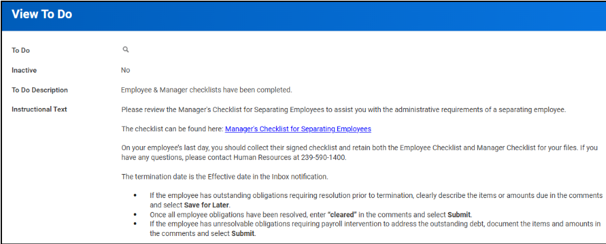
What’s New: Managers will now receive a “To Do” list reminder in their Workday Inbox that must be completed on an employee’s final date of employment, as part of the termination business process.
What You Need to Do:
- Complete the Manager Checklist for the terminated employee.
- Once all required steps in your Workday “To Do” list is completed, you will be able to submit the process.
Important: The “To Do” list found in your Workday Inbox must be submitted for the Payroll Office to issue the employee’s final paycheck. Delays in completion may result in delayed payment.
Questions: Contact the Payroll Office at payrolloffice@fgcu.edu.


